Project
HTML to EXE Builder
Professional desktop application that converts HTML/CSS/JavaScript web projects into Windows .exe desktop apps, Python scripts into executables, and web frameworks into Android APKs. No coding or command-line knowledge required!
Currently Developing...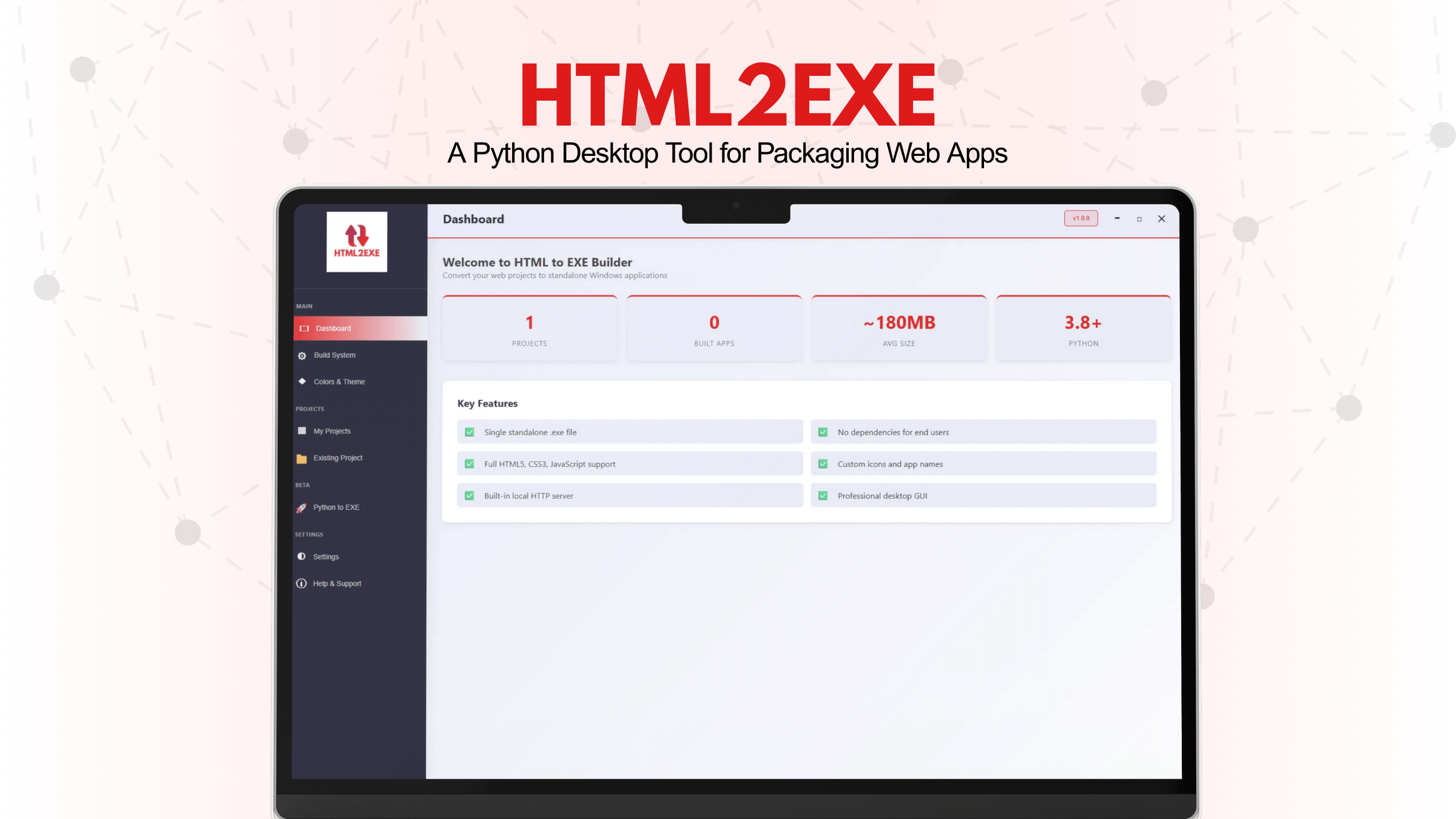
HTML to EXE Builder – Desktop Application
A professional desktop application that converts HTML/CSS/JavaScript web projects into Windows .exe desktop apps, Python scripts into standalone executables, and web frameworks into Android APKs. No coding or command-line knowledge required — everything is done through a sleek graphical interface.
What Does This App Do?
• HTML to EXE — Take any web project (HTML, CSS, JavaScript) and package it as a native Windows desktop application (.exe). Users can run it without a browser, without a web server, without anything installed.
• Python to EXE (Beta) — Convert Python scripts and projects into standalone .exe files. End users don't need Python installed on their machine.
• Web to Android APK (Beta) — Convert HTML, React, Vue, and other web projects into native Android APK files. Works best with plain HTML/CSS/JS and React projects.
Key Features:
• Single .exe output — Everything bundled into one file — just share it
• No dependencies for end users — Recipients don't need Python, Node.js, or anything else
• Custom app icon — Upload a .png or .ico file as your app icon
• Project management — Create, import, and organize multiple projects
• Framework detection — Auto-detects React, Vue, Angular, jQuery, Svelte, Bootstrap, Tailwind, Next.js, etc.
• Python to EXE (Beta) — Convert Python projects with auto-detected imports and data files
• Web to Android APK (Beta) — Convert web projects to native Android APKs using Capacitor
• Professional GUI — Modern, frameless dark-themed desktop interface built with PyWebView
• Color & Theme panel — Manage and explore color palettes for your projects
GUI Features:
• Beautiful Desktop GUI with professional project management interface
• Import Any Project - Scan folders with any structure (handles 1000+ nested folders)
• Smart File Discovery - Auto-finds HTML, CSS, JS files recursively
• Dashboard with project statistics and build history
• Advanced build preferences and configuration options
• Custom Icons and Window Titles
• Single-file or directory packaging options
• PyInstaller-based packaging with optimization
• Automatic entry point detection for Python projects
• Live preview for color and theme customization
Supported Platforms:
• HTML to EXE: Windows 10+ (64-bit) — no browser or dependencies needed
• Python to EXE: Windows 10+ (64-bit) — no Python installation needed
• Web to Android APK: Android 6.0+ devices — universal app support
Framework Support for Web to Android:
✅ Plain HTML/CSS/JS — Fully Supported
✅ React (Vite, Create React App) — Fully Supported
✅ Vue (Vite) — Fully Supported
✅ Svelte / SvelteKit — Fully Supported
🚧 Angular — In Development
🚧 Next.js 13+ (App Router) — In Development
⚠️ Nuxt 3 — Experimental
⚠️ Gatsby — Experimental
What Works in Generated Files:
HTML to EXE & Web to Android APK:
✅ HTML5 / CSS3, Vanilla JavaScript, DOM manipulation, Canvas & SVG, localStorage API, sessionStorage API, Fetch API (local), ES6+ features, React, Vue, Svelte, CSS animations & transitions
❌ Node.js / npm modules, Back-end servers / API routes, Electron-specific APIs, Direct file system access, CORS-blocked external API calls, Server-side rendering (SSR), WebSockets, Backend form submission
Python to EXE:
✅ Standard Python scripts, Third-party packages (auto-detected), Data files (JSON, YAML, CSV, etc.), GUI frameworks (tkinter, PyQt, etc.), Web frameworks (Flask, Django)
Tech Stack:
• Frontend: Python 3.8+, PyWebView 5.0+, HTML/CSS/JavaScript
• Build Tools: PyInstaller 6.10+, Capacitor (for APK), Gradle (for Android)
• Processing: Pillow 10.0+ (image conversion)
• Platform: Windows 10/11 (64-bit)
• Optional: Android SDK, Java JDK 17+, Node.js 18+ (for APK building)
System Requirements:
For Builder (Developer Machine):
• Operating System: Windows 10 or Windows 11 (64-bit)
• Python: Version 3.8 to 3.12 recommended
• Disk Space: ~500 MB free (for Python packages and build output)
• RAM: 4 GB minimum, 8 GB recommended
• Internet: Required only for initial package installation
For Android APK Building (Optional):
• Java Development Kit (JDK): Java 17–24
• Android SDK: Installed at %LOCALAPPDATA%\Android\Sdk
• Node.js: v18+ (required for npm and web framework builds)
• Gradle: Auto-downloaded on first build (~500 MB)
Outcome:
A professional, feature-rich desktop application that enables developers to package and distribute their HTML/CSS/JavaScript, Python, and web framework projects across multiple platforms (Windows desktop, Android mobile) without requiring end users to have any development tools or runtime environments installed. Supports modern frameworks, provides beautiful UI, and streamlines the entire build and distribution process.
Links
View source codeBuilt with
February · 2026
